Walk into every 1:1 with the context you need.
LeaderCues remembers what you discussed, what you promised, and what keeps coming up, then gives you a private prep before your next 1-1.
Private to you. Not an HR tool.
I built LeaderCues after repeatedly walking into 1:1s knowing there was something important I was forgetting.
Aleksandr, engineering manager
See what LeaderCues remembers for you
These are the only notes LeaderCues has about Rachel, from her last two 1-1s. Build the prep to see what it brings into the next one.
Rachel Doyle
Backend Engineer
1-1, 4 weeks ago
- Rachel asked about a raise again, I said I'd check with Marta before the next review cycle.
- Rachel is finishing the billing migration, the estimate was 20 days and she's done in 9. Agreed to refactor the export component after.
- Tom's review comments on Rachel's PRs came across as harsh again, second time she mentions it.
- Rachel moves her vacation to the first half of December.
1-1, 2 weeks ago
- Rachel has been feeling unwell, says her immune system is down.
- Rachel is going to Lisbon next week, out Thursday and Friday.
- I still owe Rachel my comments on the caching doc.
- Rachel is waiting on another team's module for the import feature. Without it she can't run full integration testing, so bugs may still surface.
Eight short notes in, a prep out. Nothing on this side is written by hand.
Why do engineering managers lose context between 1-1s?
- You can recall every detail of last week's incident, but not what you and your report agreed on in the last 1-1.
- Someone brings up the career conversation you promised to continue three weeks ago, and you have nothing.
- Your notes about people are spread across four apps, two notebooks and a Slack message to yourself.
- A resignation that seemed to come out of nowhere had been leaving traces in your notes for months.
LeaderCues keeps that context in one place, where you can actually act on it.
How it works
Write notes the way you already do
After a 1-1, or whenever something comes up during the week, you write a quick note about the person. That's the only input the app ever needs from you.
AI turns notes into cues
When you finish a note, the AI reads it and suggests cues: a follow-up you promised, a sign that someone is overloaded, a career topic that came up in passing. Each suggestion waits for you to confirm or dismiss it before it becomes anything.
Get a prep before every 1-1
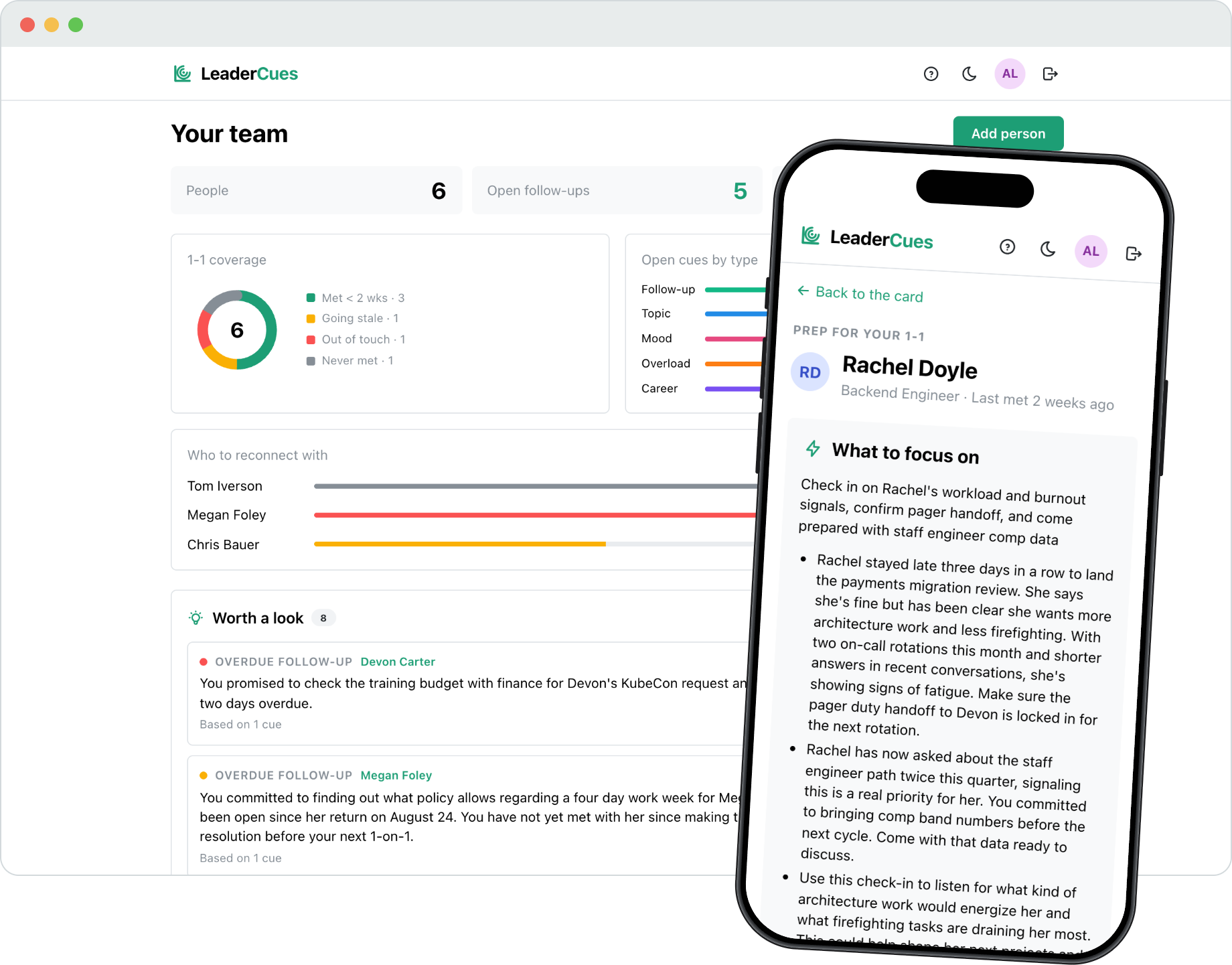
Before the next meeting you get a short summary of where things stand with this person: which topics are open, which follow-ups are still hanging, and what changed since you last met.
What shows up after a few weeks of notes
The prep is useful on day one. The patterns are what you get for keeping at it.
Topics that keep coming back
The same career question, the same blocker, the same team friction. When something returns for the third time, you see it written down instead of half remembering it.
Follow-ups that quietly slipped
Things you promised in a 1-1 stay open until you close them, with the date you said it and how long it has been waiting.
Overload and mood signals
Late nights, back-to-back on-call, shorter answers than usual. Small notes add up into something worth asking about before it becomes a resignation.
Career conversations that went quiet
A growth thread you started months ago and never picked up again comes back to you, with the context of what was said.
The whole loop, not just the prep
1-1 cadence and reminders
Tell the app how often you meet each person and it will email you before the meeting, with a link to the prep and a count of open cues. If you already have a rhythm with someone, it notices and suggests the schedule on its own.
Weekly team digest
If you turn it on, you get one email on Monday morning: the people you haven't met in a while, the follow-ups that are still open, and anything the AI noticed across the team during the week.
Team snapshot
The home screen shows how your 1-1 coverage looks, which kinds of cues are piling up, and who you should probably reconnect with. It describes where your attention goes, and it doesn't rate anyone.
Noticed lately
Some things only become visible over time, like a follow-up that keeps slipping or a career conversation that went quiet months ago. The AI points these out, shows which cues each observation rests on, and lets you dismiss any of them for good.
Seven languages
The interface and everything the AI writes work in English, German, French, Spanish, Portuguese, Russian and Greek. You pick a language once and both follow it.
Private and secure
Two-factor authentication is there from the first day, nothing external reads your notes, and nobody else has access to your workspace. If you delete your account, everything in it is erased permanently.
What it isn't
- It's not an HR system. It doesn't produce performance reviews, ratings, or reports for anyone.
- Your reports never see it and never get an email from it. Unless you tell them, they won't know it exists.
- The AI's job is to prepare you for a conversation. It doesn't score people or draw conclusions about them.
- Everything the AI writes is traced back to a note you wrote yourself. When your notes don't support a claim, it stays quiet instead of making something up.
Pricing
The free plan works for as long as you want. Once the AI prep becomes part of how you run a whole team, pay $7 a month or once for lifetime access. Same product either way.
- As many people, notes and 1-1s as you need, with no time limit.
- 15 AI credits in your first month so you can try the prep loop properly, then 5 a month. One credit covers one prep or one note analysis.
- All features included, no card required.
No password. Sign in with a quick email code. No credit card.
Launch my workspace- 200 AI credits a month, enough for a prep before every meeting and analysis of every note across a full team.
- Cancel whenever you want from the settings page.
Pay once, keep it forever.
- The same 200 monthly credits as the subscription, refilled every month for as long as LeaderCues exists.
- No subscription behind it, nothing to cancel or renew.
Payments handled by Paddle. Refund policy applies.
FAQ
How do I get in?
Enter your email, type the six-digit code from your inbox, and you are in your workspace. No password and no forms to fill in.
Is this a performance-review or HR tool?
No. LeaderCues is a private workspace for you as a manager. Nothing is shared with HR, your company, or your reports.
Can my reports see what I write?
No. They never interact with the product and never receive anything from it.
What exactly is an AI credit?
One AI action: building a 1-1 prep or analyzing a completed note for cues. The free plan includes 15 credits in the first month, then 5 a month. Notes and 1-1s never cost credits.
What happens when my free credits run out?
Everything keeps working: notes, people, history, follow-ups you manage by hand. AI picks up again next month, or you move to Plus at $7 a month, or the $90 one-time lifetime purchase.
Where does my data live and can I delete it?
Your data is scoped to your account only. Deleting your account erases everything you own, permanently.
Who is behind this?
A solo founder who managed engineering teams and kept losing context between 1-1s.
Why this exists
I tried to keep notes on a large team in my head. The conversations that mattered most started cold, and the follow-ups I promised kept slipping.
LeaderCues is the tool I wanted: a private place that remembers what I discussed, what I committed to, and what to bring up next time.
Try it before your next 1-1.
Setting up takes a couple of minutes, and the first prep is ready on your first day.